Interview with Cathy Leung, Dartslive Official Player

Read Cathy Leung's tips on darts training and her message to all Singapore darters!

Interview with Shot! Geo Dart Case designer

Talented student designs the Shot! Geo Dart Case

Unboxing Target Carrera Octane series

A closer look at Target Carrera Octane series

Interview with Masa Lui, Dartslive Official Player

Masa Lui, the youngest Dartslive Official Player shares his thoughts and tips!

Beginner's guide to DARTSLIVE member card

A brief beginner's guide to using the DARTSLIVE member card and its online features

Showing posts with label Guide. Show all posts

Thursday, May 23, 2013

How to obtain Dartslive Award Movies

What is Award Movies ?


Award Movie is the short animated video shown on the Dartslive screen when you hit a special feature during the game of cricket, 01 or Count - Up. Examples of special features are Hat-Trick (3 bulls) or 3-in-a-bed (3 darts in a triple segment). These "congratulatory" movies typically run for about 4-5 seconds and can be aborted by pressing the player change button on the board.

Award movies are typically produced in a full set. Each set comprises 7 different movies. Example, the Neon Award Movies set have a complete set of movies for all the special feature that can be hit. They are:
  1. Low Ton
  2. High Ton
  3. Hat Trick
  4. 3-in-the-black
  5. 3-in-the-bed
  6. White Horse
  7. Ton 80

How to get the movies ?

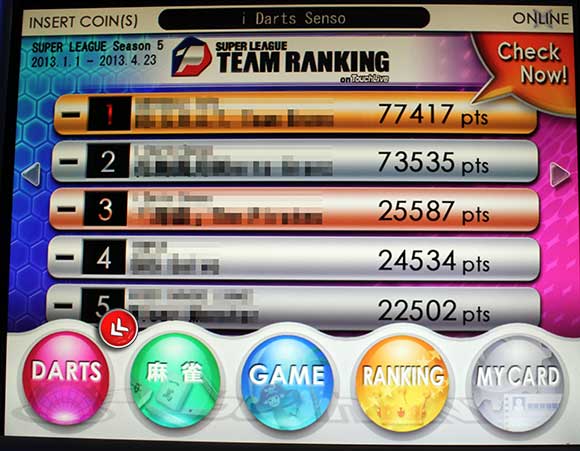
From the main menu, press the "Darts" icon (indicated with rounded red arrow below)


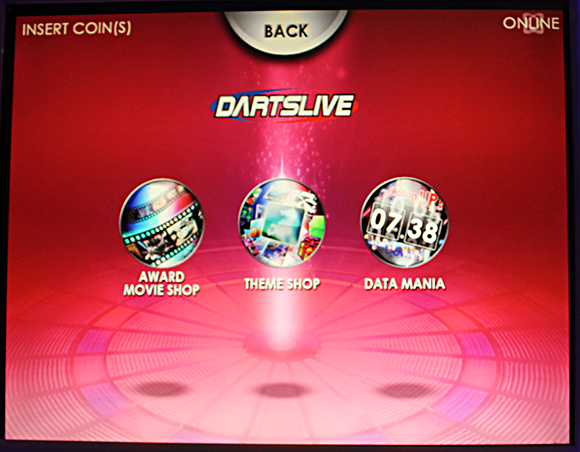
Then, press on the Award Movie Shop icon (left most)


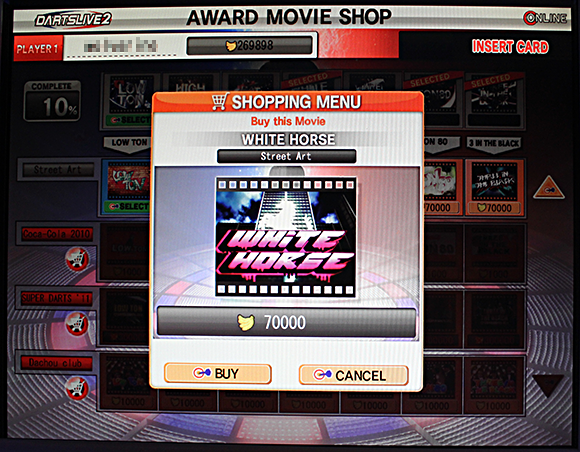
The Award Movie shop will be shown as below


Legend (see above)

  1. Card Display name - Your card name will be shown here
  2. Bananas available - This is your bananas available for purchase on this card. Banana is a form of currency in Touchlive, allowing you to purchase themes, award movies and other virtual accessories. So, what you need to do here is select the theme that you like and click on "Purchase"  button. If you have insufficient bananas to purchase an expensive Award Movie, the "Buy" button is disabled.
  3. The selected award theme for this feature (White Horse) has a red banner across it.
  4. Column Labels for the Movie Awards
  5. The Percentage of completing the collection of the award set
  6. Scroll down for more themes
  7. The name of the theme set (shown : Darts Master). Click the cart icon to see the conditions needed to purchase this theme. Example of conditions are like "Score 500 or above in Count Up today" or "Play darts against 3 or more players with your card today"
  8. Click on the Award movie to purchase it at the cost of the bananas shown. You will be presented with the Shopping Menu below. Click on Buy to proceed.


Currently, the Award movies can only be viewed, obtained, set or changed via Touchlive machine. There may or may not be purchasing conditions attached to each series. Some may be purchased at certain events or at a certain time only while some may be purchased only after you hit the special feature. The Award Movies cannot be purchased by cash.

How to set the movies ?

After collecting the various movies, you can assign the movie that you want to be shown for each award. Press on the Green SELECT button displayed below the Award Movie to activate the movie as the current Award movie.

Present the movies as gift!

You can also give away award movies from your collection to your friends. To do this, insert both cards into Touchlive and press the Gift box icon to present the award movie.  Select the Award Movie and press submit. Do note, award movies given away will actually be removed from your own collection.

Here are some of the attractive award movies:


 Rock'n Girls Series :  Hat Trick


 Rock'n Girls Series :  Low Ton


 Penguin Series :  Hat Trick


 Super Darts 2011 Series :  3 in the black

Sunday, May 12, 2013

Dartslive Rating and Flights Classification


Here is the Dartslive Rating Table and Flights Classification:


Flight
Rating
01 PPR
Cricket MPR
Count-Up
C
1
0 - 39.99
0 - 1.29
0 - 319
2
40 - 44.99
1.30 - 1.49
320
3
45 - 49.99
1.50 - 1.69
360
CC
4
50 - 54.99
1.70 - 1.89
400
5
55 - 59.99
1.90 - 2.09
440
B
6
60 - 64.99
2.10 - 2.29
480
7
65 - 69.99
2.30 - 2.49
520
BB
8
70 - 74.99
2.50 - 2.69
560
9
75 - 79.99
2.70 - 2.89
600
A
10
80 - 84.99
2.90 - 3.09
640
11
85 - 89.99
3.10 - 3.29
680
12
90 - 94.99
3.30 - 3.49
720
AA
13
95 - 101.99
3.50 - 3.74
760
14
102 - 108.99
3.75 - 3.99
816
15
109 - 115.99
4.00 - 4.24
872
SA
16
116 - 122.99
4.25 - 4.49
928
17
123 - 129.99
4.50 - 4.74
984
18
130 + 
4.75 +
1040 +

PPR : Points per round, total points scored in one round of 3 darts in an 01 game
MPR : Marks per round, total marks scored in one round of 3 darts in a cricket game
Count Up : The average PPR score multiplied by 8 (rounds)


The Dartslive rating classification was originally based on Medalist Rating classification but the specific calculation method remains undisclosed by Dartslive. This is because Dartslive uses a 80% statistics method rather than 100% statistics, i.e. not all darts thrown are used for the calculation. The rating will usually be higher than using a 100% statistics method.


Wednesday, April 24, 2013

Beginner's guide to DARTSLIVE member card

A brief beginner's guide to using the DARTSLIVE member card and its online features.


When you look at a DARTSLIVE board, one of the most distinguishing feature of the board (apart from the LED-backlit target) are the four slots found at the front of the board.

Most new players do not know or even notice these slots until they see other darters slotting in cards with fancy designs into them. Well, these cards are DARTSLIVE member cards which are basically RFID cards storing your personalised name, rating and other basic info about your darts experience. These cards can be used both on DARTSLIVE dart boards or the TOUCHLIVE video game machine. They both share the same network, so you can set your personalised nickname on a TOUCHLIVE machine and then play darts with your nick name shown on the darts board.

Variety of DARTSLIVE member cards

With the card, you can also login (either via a smartphone app or website) to DARTSLIVE website and do many more things online. Here are some of them :
  • Check your previous dart game results and records
  • Check where you are in your country's ranking charts
  • Change your name, nickname and award messages that are displayed during a darts game
  • Change the theme that is shown in the background during a darts game
  • Exchange information with your friends on the website and many more
Sounds interesting ? It is, as it opens up a whole new side of darts - the personalisation and social side.

How do we get our hands on a DARTSLIVE card ?

You can purchase the DARTSLIVE card from any of the DARTSLIVE shops. Some can also be purchased online but it is usually not worth the cost of shipping it to you unless the card is of a limited design or a special edition card. 

You can own and use multiple cards at the same time for various purposes such as competition, casual play, league etc etc. However, I would suggest having just one main card for game play. It is a lot easier to manage your rating as the card store your previous game play and you can track your rating accurately as you play in various shops or events.

OK, I got my new DARTSLIVE card, what's next ?

Go to the website www.dartslive.com and click the NEW REGISTRATION button on the left hand side.

Follow the instructions on the page and fill in the information, including the 16 digit card ID found on the back of your DARTSLIVE card and then a 4-digit PIN number of your own liking. Click on the REGISTER button when done. You may now login to your card page using this 16-digit card ID and the 4-digit password number, either on a browser or a smartphone app.

If you get an error message saying the card ID have already been registered, that means someone have already registered the card. In this case, you will need to click on the "LOGIN" button from the website and login using the 16-digit id and the 4-digit PIN number. If you don't have the PIN number, then you will need to return the card to the shop where you purchase from and get another new card.

The card is registered now! How do I login to DARTSLIVE member page/app?

Now that you have registered your card, you can now login to the website and customised your name and other information. After logging in, on the main page, click on the button labeled "Settings" (see below picture). Note, your screen may differ from the picture below slightly depending on the size of the screen.

Alternatively, you can download the DARTSLIVE app available for iPhone or Android phones and perform the same functions described below.

Dartslive Member page

The Settings page is where you can make changes to your name (CARD NAME) or nickname (CATCH PHRASE) that is shown on the screen when you play a darts game or a TOUCHLIVE game.In case you are wondering what is the difference between the two, the Card Name is the name shown when you slot the card in, the Catch Phrase is shown during your turn in a game play.

That's it. Those are the bare minimum you need to set to start using the card. You can start playing with the card now.

What are the other features that I can customise?

After logging into the Card member page, you can access many information about your darts games and customise your game screen. Here are some of the highlights :

1. Card data
Your basic card information is shown here in the top page. Your card name, catch phrase along with your current rating is shown here.

2. Play Data statistics
It shows your game play statistics and awards or features hit.

  • Your current rating (rounded down to a whole number) and the reference rating (exact decimal point) and your flight. Dartslive flight ranges from C, CC, B, BB, A, AA and SA
  • 01, Cricket and Count-up stats
  • Type of Awards and features and the count hit for the past 2 months
  • Recent play data
  • Track your monthly darts performance movement in the past 12 months, along with a chart. There are 4 types of performance measurement to choose from - rating, 01 games average, cricket games average and Count Up score.

3. Theme Menu
Click on the Theme button to access the list of themes that is available for selection on this card. You can read more about themes in this article on How to collect themes. You can view all themes currently owned and "register" your favourite themes so that you can select them easily without having to scan through all your themes.

You can also purchase new Themes in this menu page. The new themes available for purchase are changed every month and you use DARTSLIVE points to purchase the themes. Points are earned at the end of a game ( you will see a message - "You won 10pts").  I will discuss about the DARTSLIVE points in a future article.

4. Group menu
The Group menu offers features such as messaging within a group. You can also view the rankings among your Group members covering games like 01, cricket, count-up, etc.  "In group theme list" shows the themes in used by all your group members, while "Monthly Group League" sets up a mini league between group members and shows the points won when they play against each other.

To add your friend to the group, you need to play a game with him/her. Once done, click on the "Click here to invite to this group" button and select your friend to add.

5. Home Shop
You can register your favourite shop as your Home shop to check your home shop information such as in-shop players ranking and in-house league score.

6. My Awards
You can register awards messages with your own personalised messages. Awards messages are words that appear scrolling on the screen when you hit an award such as Hat trick or 3 in a bed. This is done in the user settings page.

7. User Settings
You can change the name of your card, your PIN to a more secure number, check your card information or copy your stats to a another new card in this page. Also, in this page, take note of the "Payment Settings". It will show how many days remaining for this service, after which it will expire and you will no longer be able to login to the page.


There is an expiry date for this service?

Yes. Depending on where you initially get the card, by default it could be 15 days or 30 days. You can check the expiry days left under "Payment Settings" found in the "Settings" page. After expiry, you can no longer login to the page. However your game statistics are still kept and your rating is still calculated. You can still play games using the card and it will still show your name and theme. You are just not able to make any changes to your themes or access other information that is stored with the card. Note, some events such as the SUPER LEAGUE require the card to be active during league sign-up.

A 90-day DARTSLIVE Pass
To get an extension to the service, you will need to obtain the DARTSLIVE PASS (D-Pass) card at any DARTSLIVE shop. The D-Pass card is a members extension card to extend your membership. Depending on your location around the world, there may or may not be a fee charged for this D-Pass card. If there is a fee charged, it typically cost about the equivalent of a few games per month.

Once you have the D-Pass card, login to your page and click on the "Membership Extension" link.  Follow the messages on the screen and key in the serial number found on the back of the D-Pass when prompted and your service will be extended for another 90 days.

One D-Pass card only works for one extension of a Dartslive card only. If you have multiple Dartslive cards, you will need to obtain multiple D-Pass as well. Note, the "extension" function cannot be used if there are still more than 30 days left to the expiry.

<<Update Footnote (Feb 2014):  Dartslive app is now a "freemium" app, some function of the app is available for free for all users and there is another section where it requires a monthly payment of US$5 to access. The 90Days D-Pass card concept has been abandoned with the introduction of the Premium membership. >>


Saturday, October 15, 2011

How to collect Dartslive Theme?

Customise your Dartslive game screen with your favourite themes

Dartslive themes are customised background screens shown behind your scores during a game of 01, Cricket or Count-up. There are many many backgrounds available for you to choose from and once a background is chosen, it will remain for the duration of the current game. Make your themes  extra special by "powering-up" your themes using your phone app (see below).

So how do I get themes ?

There are 4 sources where themes are available for selection or "purchase". 2 of them costs some virtual currencies while the other two sources may be free, though you will need to play some games.

The first, is from a Touchlive machine. Select the "Themes" option on the Touchlive and you will see a list of current themes available for purchase using "Bananas". Banana is a form of currency in Touchlive, allowing you to purchase themes, award movies and other virtual accessories. More on Touchlive Bananas later. So, what you need to do here is select the theme that you like and click on "Purchase"  button. If you have insufficient bananas to purchase an expensive theme, the "Buy" button is disabled.

Assuming you have enough Bananas to purchase the theme of your choice, you will be prompted to click Buy. Click Buy to make the purchase and the theme will be added to your Dartslive Member card! At the same time, it is automatically set as your current theme. Now, the next game that you play will be played with the selected background picture.

The second method where you can buy or select themes is on the Dartslive Phone App, available for iPhone or Android via their respective App store or Android Market. To access the Phone App, you need a Member card that is still valid. If it has expired, you can get it extended by obtaining the "90-day DPass" card which contains a 16-digit number that you need to key in to extend the validity of the Member card. This 90-day card may be sold at a price in some locations.


So, after you installed your Dartslive Phone App, you can view your list of themes and switch or purchase additional themes. Some themes are  exclusively purchased from the Phone App. The currency to purchase themes on the phone app is "Dartslive Points". You get these points whenever you play Dartslive or Touchlive. At the end of a game on Dartslive board, you will see some messages like "20pts awarded" being shown. This is the currency being awarded to you for purchase on the phone app.

The third method to obtain a theme is to get it from your friends! Yes, just play a game with your friend and his theme will be copied to you at the end of the game. Get your friend to select a theme that you want before starting the game, at the end of the game, the game is copied to you. Note, the theme copy function may work the other way round too, i.e. your theme may be copied to your friend, the direction of the copy is unpredictable. So you can either play games until you get your friend's theme or you can play with a theme that your friend already owns. That way, since he already has your theme, you will get his theme. Also note, not all themes can be copied. They must be obtain by yourself and remains with the original owner. These themes are indicated with a wine glass next to the theme (see picture below)

Well, there is one last method of collecting a theme especially one that cannot be copied to you. However it is not really collecting, but more of "giving". Take for example, your friend have a theme that cannot be copied out. Ask your friend to "give" you the card, along with the PIN number password for the website login. You will get all the themes that are on the card. You can then change the card name via the DARTSLIVE website login and customise it to your own liking. You will probably need to play at least 30 games on the card for it to accumulate your own rating.

What kind of themes are available ?

There are 8 types of themes available
  1. Basic
    These are static pictorial themes which can be purchased using Dartslive points. New themes are unveiled every month.
  2. Rich Basic
    These themes, which are more elaborate, are sold on an irregular basis and difficult to obtain. Some are only available for limited period only.
  3. Touchlive
    These themes are only sold in Touchlive Theme Shop. Basic themes sold in the past are sometimes available as daily specials in Touchlive and can be purchased using bananas.
  4. Premium
    Premium themes are distributed and sold in limited quantities. They cannot be copied to other cards and are usually animated or more elaborate.
  5. Campaign
    Campaign themes are made available at special events or when you complete certain types of game campaigns.
  6. Players
    These special themes are owned by Dartslive PRO, Live Queen and some of the top players. They typically portray their own pictures.
  7. Shop
    These are location or the shops' original themes and can be obtain by playing Dartslive at those shops
  8. Special
    These are themes that can be obtained only by special methods such as at a special event . They usually cannot be copied.
The type of themes can be seen on the Phone App in your listing of themes obtained (see below)


You can collect more themes by playing with your friends and participating in Dartslive Campaigns or events. Watch the official Dartslive website for news on these activities!

Updated : 21 Apr 2013 with 4th method of collecting